
Apple Intelligence Daily Summaries In Sideboard
15 Feb 2026
I decided to add daily summaries in my Sideboard app using Apple Intelligence, but it didn’t turn out as well as I’d hoped
A quick recap - the app basically shows you all your upcoming calendar events for today and tomorrow, and shows a countdown both during and before your meetings
I wanted to test out using Apple Intelligence to see if it could generate a nice text summary of your day, and also learn about using Apple’s Foundation Models on device
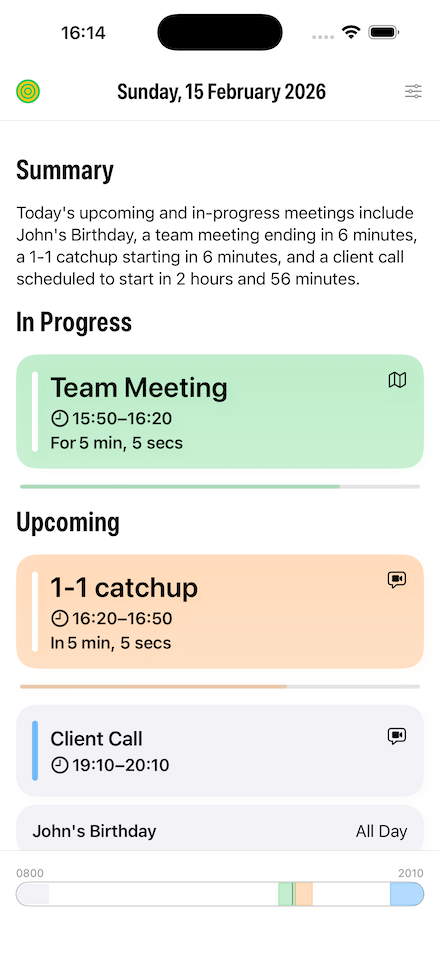
You can see from the screenshot from the iOS app below how it turned out:
The code part
Apple’s actually done a nice job of making it easy to integrate their local Foundation models into your app
You can write a Custom Tool that can expose your model data in an LLM friendly way, and then get an text summary back in a few lines of code
Below is a truncated example of my code …
let session = LanguageModelSession(
    tools: [MeetingsSummaryTool(meetings: upcomingMeetings)],
    instructions: "You are a professional productivity app. Provide a concise, business-appropriate summary for the upcoming day in a formal tone. Focus on the most important and timely information. Keep summaries to a single sentence, and don't just restate the information about the meetings, the user can see that already in the app. Don't restate the meeting details as a list. Don't add any formatting or markdown."
)

do {
    let response = try await session.respond(
        to: "Provide a concise professional summary of today's upcoming or in-progress meetings.",
        options: GenerationOptions(sampling: .greedy, temperature: 0.0) // Try to keep the results the same
    )

    return response.content
} catch {
    self.logger.error("Summarise error: \(error)")

    return ""
}
Obviously the real skill is in the prompt engineering, and the above prompts are the result of a lot of trial and error trying to get the best results
Also note the GenerationsOptions() line, where I set the temperature to 0.0. This basically tries to keeps the same results given the same input, which I wanted to do as the summary is regenerated every minutes as the upcoming meetings may change
The result
I tried all sorts of prompts to try to improve the outcome, but I was pretty disappointed in the results. Now it could be that with better prompting you would get better results, but to be honest the summaries don’t add a great deal to the app
It’ll be very interesting when Apple release their new Gemini-backed Foundation Models later this year, to see if they can do a better job. I really hope so!
If you want to try the summaries yourself, they are available via an optional setting (on an Apple Intelligence supported device of course!) in the latest version of Sideboard
P.S. The hero image at the top is obviously an AI generated image (via ChatGPT not from Apple Intelligence of course!)